Toolbar (Text)



 Change font using dropdown menu or use the arrows for step by step font change
 Change color opens color dialog window. Change text color using predefined colors or add custom
 Letter Box is used to avoid typing inside the drawing. Type the word inside the box or click the ABC icon for advanced options.
 Text Settings allows advanced letter input.
 Left Align text aligns multiline text to the left.
 Right Align text aligns multiline text to the right.
 Center Text centers multiline text.
 Align Down enables vertical letter input.
 Height defines letter height when selected.
 Word Spacing defines spacing between words in the sentence.
 Letter Width changes the width of every letter.
 Letter Spacing changes the spacing between each letter in the word.
 Letter Arc curves your words and makes an arc of them.
 Italics angles every letter by the degree of your choice
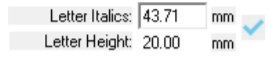 Change letter properties by entering the values manually
 Sliders allows letter properties change.
 Set Letters confirms entered text and keeps the command active.
 Cancel Letters discards all the text changes and exits the command.
Comments
0 comments
Please sign in to leave a comment.